Every developer who uses an AI coding assistant has hit this wall.
You spend an hour getting Claude up to speed on your project. The stack, the quirks, the half-finished refactor in the auth module, the reason you chose SQLite over MySQL. By the end of the session, the AI is practically a team member. It knows the codebase. It knows your preferences. It knows why things are the way they are.
Then you close the tab.
Next session: blank slate. You’re back to “so I’m building a PHP app that…”
I got tired of it. So I built a fix.
The Idea
Claude Code supports something called the Model Context Protocol — MCP for short. It’s a standardized way for the AI to talk to external tools. Most people use it to connect Claude to things like databases, search engines, or their calendar.
But I realized: it’s also a perfectly good interface for memory.
If I could build a small server that exposed simple read/write tools — “save this note about Project X,” “load what you know about Project Y” — then Claude could call those tools at the start of any session and pick up exactly where we left off.
The whole thing would be mine. Hosted on my own server. Stored as plain text files I could read and edit directly. No subscriptions. No third-party data storage.
What I Built
The system is called MCPMemory. Here’s what it does:
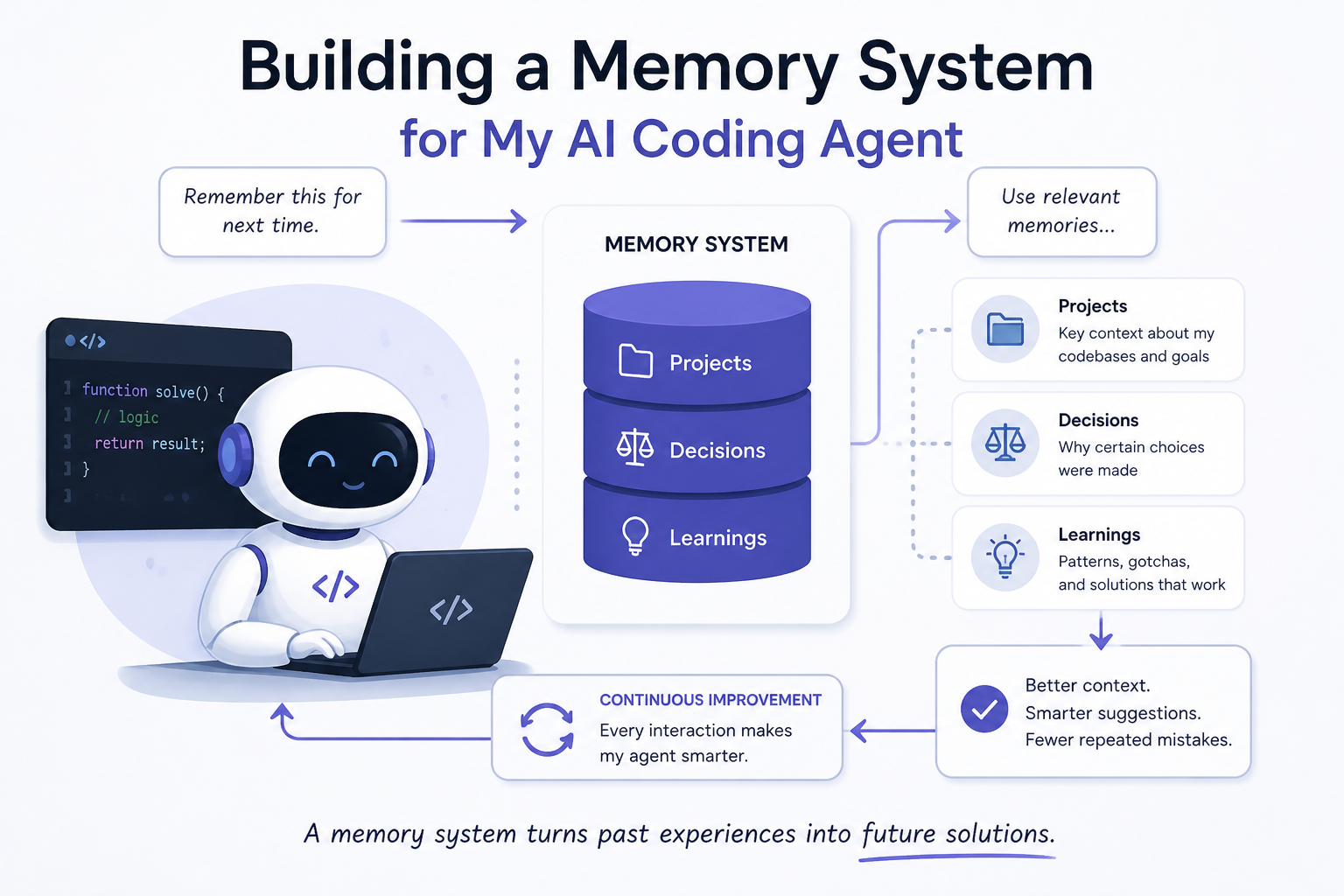
For each project, it stores three files:
context.md— the facts: what the project is, the tech stack, where it’s deployeddecisions.md— the why: architectural choices and the reasoning behind themnotes.md— everything else: gotchas, links, things to investigate
At the top level, there’s an INDEX.md — a table of all projects with one-line summaries. When Claude starts a session, it can read the index in a single call and immediately know what’s in memory.
The server exposes about a dozen tools via HTTP. Things like get_project_file, search_memory, update_file, create_project. Claude calls these the same way it would call any other tool — naturally, as part of the conversation.
The whole backend is about 400 lines of PHP. It runs on the same shared hosting I use for my other projects. The total added cost: $0.
How It Works in Practice
I register the server once in Claude Code:
claude mcp add --transport http --scope user project-memory \
  https://claude-memory.russturley.com \
  --header "Authorization: Bearer MY_TOKEN"
The --scope user part is key. It makes the memory available across all my projects, not just the one I’m currently in.
After that, I don’t have to think about it much. Claude reads memory when it needs context, writes memory when something worth keeping happens, and updates the index when a project’s status changes.
Here’s a real example. I have a project called WorkBillGo — an invoicing SaaS for solo tradespeople. I hadn’t touched it in a few weeks. When I started a new session, Claude called get_project_file and loaded the context. Within thirty seconds it knew: Laravel backend, Stripe Express for payments, nearly done, last blocker was the PDF generation module. We picked up mid-task without me saying a word about the project history.
That used to take five to ten minutes of re-explanation. Now it takes seconds.
What Gets Stored
Not everything belongs in memory. I’ve developed a rough rule: memory is for things that would take more than two minutes to reconstruct from scratch.
Good candidates:
- Tech stack and deployment details
- Why you chose approach A over approach B
- Known bugs or quirks that aren’t yet fixed
- Credentials structure (not the credentials themselves — just which env vars exist and what they’re for)
- Project status and what’s left to do
Bad candidates:
- The specific task you’re working on right now (that’s what the conversation is for)
- Code patterns (those live in the code)
- Recent changes (that’s what git is for)
The AI has gotten pretty good at knowing which is which. When I make a significant architectural decision, Claude will often say “should I save that to memory?” and I say yes or no. It’s a natural part of the workflow now.
The INDEX.md Problem (and How We Fixed It)
One thing I noticed early on: when Claude created a new project entry, it was writing the rows with a formatting bug. The entries were being appended outside the Markdown table instead of inside it, so they rendered as raw text rather than table rows.
The fix was a two-line change in the PHP. Instead of opening the file in append mode and blindly adding a new line, the server now reads the full file, trims any trailing whitespace, and writes the new row cleanly at the end of the existing table.
$current = rtrim(stream_get_contents($fp));
fwrite($fp, $current . "\n| [$project]($encoded/context.md) | $summary |\n");
Small fix, big difference. The index now renders as a clean, clickable table in any Markdown viewer.
What Changed
After a few months of using this system across fifteen-plus active projects, the biggest change isn’t speed — it’s confidence.
I know that context doesn’t disappear when I close a session. I know that the reasoning behind a decision from three months ago is retrievable. I know that when I come back to a project after weeks away, I won’t be starting cold.
That changes how I work. I’m more willing to end a session when I’m tired instead of pushing through just to avoid losing context. I’m more deliberate about recording the why behind decisions, because I know it’ll actually be used. I treat the AI more like a colleague and less like a tool I have to constantly re-train.
The Bigger Idea
What I built is small. But I think the pattern is significant.
Most people think of MCP servers as a way to connect AI to external services — databases, search engines, APIs. That’s the obvious use case. But the MCP interface is equally powerful as a persistence layer for the AI itself.
Your AI assistant doesn’t have to start from zero every session. A few hundred lines of code and a text file directory is all it takes to give it a working memory.
If you’re managing more than two or three active projects, it’s worth building.
The full whitepaper with architecture details, schema design, and implementation notes is available alongside this post.